 |
Beyond Code: An Introduction to Model-Driven Software Development (CISC 844, Winter 2026)
Assignment 3 (MDSD with HCL Code RealTime)Due: Mon, March 16
|
Intro
- Purpose of the Assignment:
- Give you practical experience with timed systems, replication, and unwired ports (in the context of UML-RT and Code RealTime) (Part I).
- Show how the model can be integrated with a GUI (Part I).
- Critically compare graphical modeling and textual/graphical hybrid modeling (Part II).
- Preparation:
- You need to install HCL Code RealTime (C-RT) version 3.2.0 for this assignment.
The two key differences between M-RT and C-RT
are:
- C-RT allows for capsules and state machines to be described using a textual (human-readable) language called Art. Diagrams can be generated from these textual descriptions. Both views are kept in-sync when one of them is modified.
- C-RT targets recent IDE platforms (most notably VS Code and Eclipse Theia) that feature a modern web technology stack (encompassing the Monaco code editor and an internal architecture that leverages the Language Server Protocol (LSP) and the Debug Adapter Protocol (DAP) for a modular, standardized implementation of the internal communication between the IDE and the editors and debuggers it supports).
- Several online resources are available for installing and using Code RealTime and learning Art:
- Code RealTime: main page, overview, installation instructions, and VS Marketplace page
- Art: descriptions of the language, the editor and diagrams, and the steps for building and running and debugging
- Sample models: Can be found here
- You will also need an X-server and the SDL2 library. See the orginal Model RealTime instructions if you have not installed these yet.
- You need to install HCL Code RealTime (C-RT) version 3.2.0 for this assignment.
The two key differences between M-RT and C-RT
are:
Part I (35 points total)
- Problem Description:
Space Invaders is considered one of the most successful and influential video games of all time. The goal of the game is to destroy alien spaceships that slowly descend from the top of the screen. The player operates a spaceship at the bottom that can move sideways and shoot. The player wins once all alien spaceships are destroyed. The player loses if they have been hit a certain number of times, or the aliens reach the bottom of the screen.The provided model implements the game in UML-RT using the SDL library for keyboard input and graphics. It is, however, incomplete. Your task is to complete the model as described below.
- Description of provided UML-RT model:
Most capsules in the provided model directly correspond to objects in the game (Player,Enemy,Bunker,PlayerBullet, andEnemyBullet). Since instances of these capsules also appear on the screen, we will call these rendered capsules and their instances rendered objects. Also, we will use the terminology player, enemy, bunker, player bullet, and enemy bullet to refer to instances (objects) of the corresponding classes. Apart from the rendered capsules, there are three helper capsules:EnemyHarness,Enemy2BulletConn, andBullet2BunkerConn. TheTopcapsule contains all of these capsules and is connected to all rendered capsules and the harness via internal ports.
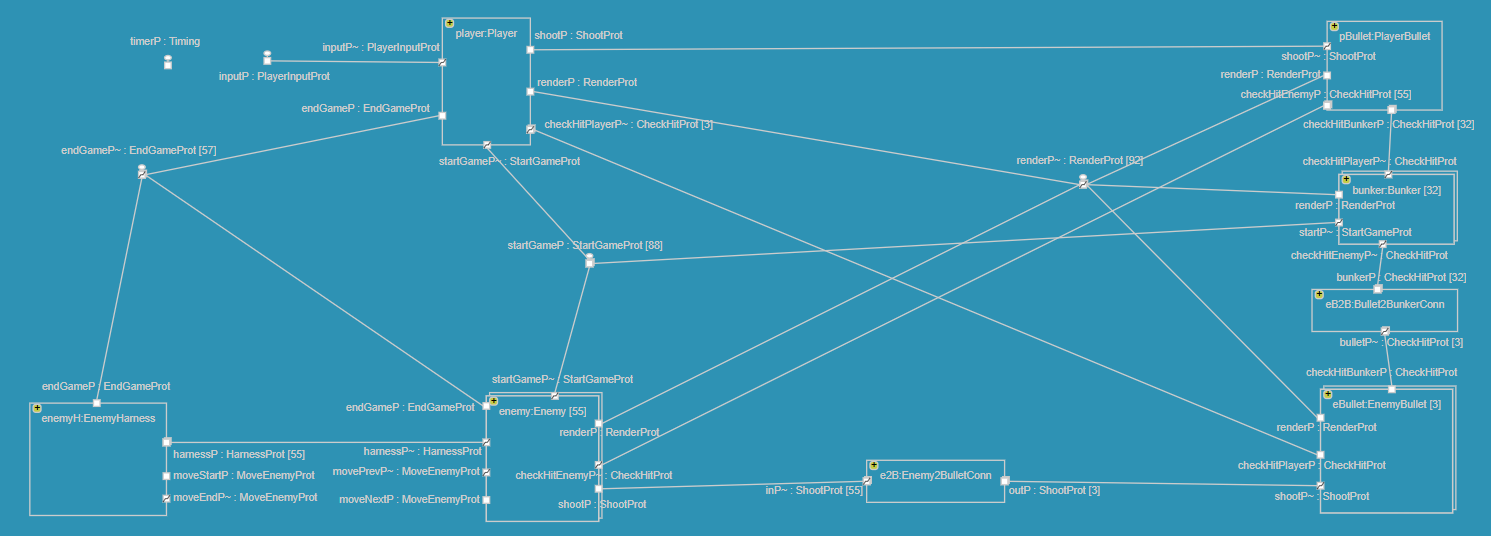
- Capsule
Top: The purpose ofTopis to- start the game by sending the message
start()to player, enemies and bunkers (via internal portstartGameP), - interact with the user, i.e.,
- it periodically uses the SDL library to check for keyboard input.
In case of movement commands,
Topsends amove(direction:int)message to the player via internal portinputPinstructing it to move left or right. In case of a quit command (i.e., down-arrow key), it terminates the game. - it listens to
render(shape:Shape)messages from the rendered objects which will cause it to use the SDL library to render the argument shape. On screen, rendered objects are represented by rectangles of different dimensions (i.e., width, height) and colour (i.e., RGB values). TheShapedata type encapsulates this information together with x and y coordinates. Screen objects tellTopabout how they should be rendered using SDL by sending it arender(shape:Shape)message. To make a shape disappear on the screen, a new shape is rendered with the same dimensions and at the same location but in black colour (i.e., RGB values 0,0,0).
- it periodically uses the SDL library to check for keyboard input.
In case of movement commands,
- end the game by listening on port
endGamePfor messages that indicate that a game ending state has been reached (playerLoses()andplayerWins()). MessageplayerLoses()is sent from an enemy that has reached the bottom of the screen or from the player if it has been hit by an enemy bullet with no lives left.playerWins()is sent by the harness when all enemies have been killed. In response,Topends the game after using the SDL library to display a corresponding message on the screen.
Top, whileTopholds no data related to the game or the position and status of objects and how they are displayed on the screen. All this information is kept by the rendered objects themselves. - start the game by sending the message
- Rendered capsules (
Player,Enemy,PlayerBullet,EnemyBullet,Bunker): Capsules of objects appearing on the screen have attributes that record the width, height, RGB values and position of their shape. Capsules of moving objects (i.e., all rendered capsules exceptBunker) also contain information about their speed (i.e., number of pixels) with which they can move per screen update, as well as the frequency of these updates (typically every 10^7 nanoseconds, i.e., 0.01 seconds). Capsules of objects that can 'die' or disappear (Player,Enemy,Bunker) have attributes allowing them to keep track of their status and determine when to die (e.g.,healthPoints:intforBunkerandlivesLeft:intforPlayer).
Some of the rendered capsules have connectors between them. E.g., via theshootPport a player can send a messageshoot(loc:Location)to the player bullet saying that a bullet should be fired from the argument location (datatypeLocationencapsulatesx:intandy:intcoordinates). Also, both types of bullet are connected with the objects they can hit. E.g., every time a flying player bullet updates its location, it will send acheck(loc:Location)message to all bunker and enemy objects. Upon the receipt of this message, the receiving object will check if it has been hit by that bullet. If so, it will respond with ahit()or ahitBy(id:int)(in case of an enemy bullet hitting a bunker) which in turn will cause the bullet to stop flying, disappear from the screen and become available again. - Capsule
Enemy2BulletConn: This capsule helps implement the many-to-many communication between enemies and enemy bullets. To shoot, an enemy can send ashoot(loc:Location)message viashootP.Enemy2BulletConnthen passes this message to one of the three enemy bullets. - Capsule
Bullet2BunkerConn: The second many-to-many communication takes place between enemy bullets and bunkers and this capsule helps implement it. Thecheck(loc:Location)message from an enemy bullet is broadcast byBullet2BunkerConnto all bunkers. In case of a hit, the affected bunker will respond withhitBy(id:int)whereididentifies the bullet.Bullet2BunkerConnuses that id to pass on the hit information to the correct bullet. - Capsule
EnemyHarness: The wired connector (portharnessP) between the harness and the enemies allows the harness to determine when all enemies are ready to start the game (messageready()) or all enemies have been killed (messagekilled()). The harness and the enemies also have unwired ports. When the game starts (messagestart()fromTop), the enemies use these ports to connect themselves in a circular fashion with the harness serving as the start and end of the circle. The receipt ofready()messages from all enemies indicates to the harness that this dynamic wiring has completed and that the enemies are ready for action.
- Capsule
- How to run the generated code:
The following instructions assume Windows. They should be similar for other OSs.- Open a terminal (the instructions below assume bash (e.g., Git Bash), but powershell should work as well with
appropriate modifications) and navigate to the workspace subfolder
containing the execuable. E.g.,
>> cd /c/Users/dingel/Documents/teaching/cisc844_w26/assignments/a3/SpaceInvadersV0_target/default
- Download the font file
MontereyFLF.ttfinto the directory containing the executable. - Start the X-server. E.g., for VcXsrv run
>> xlaunch &
and disable access control during the startup dialog. In Windows, use the Task Manager to check that the process is running. - Set the
DISPLAYenvironment variable:
>> export DISPLAY=:0.0
Useecho $DISPLAYto check that the variable has been set correctly. - Invoke the executable as usual:
>> ./Top.EXE -URTS_DEBUG=quit
A window should open up containing the 'Welcome to Space Invaders' screen and the model's log output should appear in the terminal.
- Open a terminal (the instructions below assume bash (e.g., Git Bash), but powershell should work as well with
appropriate modifications) and navigate to the workspace subfolder
containing the execuable. E.g.,
- Problems in the provided model: While the structure of the model is complete (i.e., it contains all necessary capsules, ports, protocols, and connectors), its behaviour is not: players and enemies cannot shoot and enemies don't move. Your task is to modify the state machines of some capsules appropriately to correct this. If you complete all parts of this assignment correctly, game play should roughly look like in this Youtube video (MP4 for higher resolution).
- Task description:
- Task 0: Prep [0 points] Download the model SpaceInvadersV0.zip, import it, inspect it, and generate code from it. Build and run the generated code.
- Task 1: Allow player to shoot [5 points]
Extend
Topso that the user can input shoot commands via the upward-arrow on the keyboard (see this Youtube video). In this case,Topshould send ashoot()message to the player. Upon receipt of this message, the player should send ashoot(bLoc)message to the player bullet wherebLocis the initial location of the bullet. Use operationcreateInitialBulletLocation()to compute this location. - Task 2: Allow enemies to move Implement this task using a sequence of three subtasks.
For all subtasks, each enemy still alive should update its location using the standard update frequency
(0.01 seconds). Use operation
updateLocation()to compute the new location and boolean operationsatRightBorder(),atLeftBorder(), andatBottom()to determine if an enemy has reached a border or the bottom, as appropriate.- Subtask a: [5 points] From their initial position, enemies should move to the right until an enemy reaches the right screen border and then stop.
- Subtask b: [5 points] From their initial position, enemies should move right and left forever. I.e., while moving into a direction, once an enemy has reached a border, all enemies should start moving into the opposite direction.
- Subtask c: [10 points] From their initial position, enemies should move right and left in alternating fashion as described for Subtask b. However, once a border is reached, they should all go down one row, before they start moving into the opposite direction. This process should continue until an enemy reaches the bottom. When an enemy reaches the bottom, the player loses and game should end.
- Subtask d: [5 points]
In a text file called
ReadMe.txt(which, as for the previous two assignments, is part of your project) briefly describe how you have implemented Task 2.
- Task 3: Allow enemies to shoot [5 points]
Whenever the position of an enemy is updated, the enemy should have a 0.02 (2%) probability to shoot.
To shoot, it sends a
shoot(bLoc)message to the enemy bullets wherebLocis the initial position of the bullet (use operationcreateInitialBulletLocation()to compute this).
- Acknowledgement: This assignment is based on the CISC 844 project of Fangjian Lei and Yiping Jia from Winter 2023.
Part II (5 points total)
- Problem Description:
We now briefly return to the problem of giving change discussed earlier. We observe the following about all three designs in Part II of Assignment 2:- Coins are dispensed in order of decreasing denominations (i.e., first all toonies, then all loonies).
- The amount to give loonies for is given by what is left over once the maximal number of toonies has been dispensed.
- Ignoring the denominations, the process of giving change is the same for toonies and for loonies (check that the amount to give change for is greater or equal than the coin denomination d; if yes, dispense a coin, subtract d from the amount to give change for, and repeat; if not, terminate).
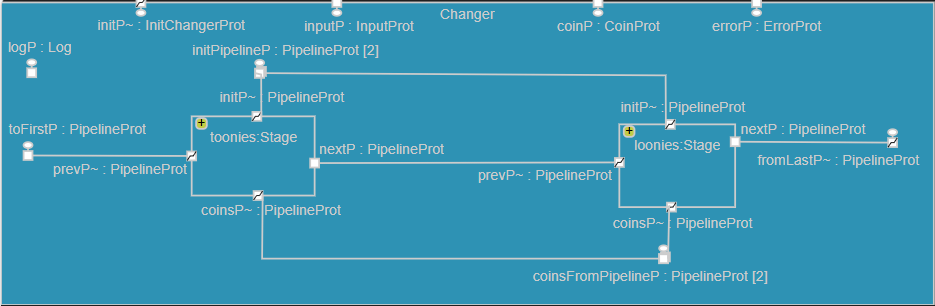
In this design, each of the two coin denominations has its own capsule instance (called
tooniesandloonies). These instances are connected to form the stages of a pipeline in which:- a stage receives the amount that (still) needs to be given
change for from the previous stage (via port
prevP); then, it gives as much change as it can (using portcoinsP), and passes on the remaining the amount to the next stage (vianextP), - the first and last stage connect the pipeline to the
Changercapsule such that- the first stage receives the initial amount to give change for
from
Changer, and - the last stage sends remaining amount to
Changer, and
- the first stage receives the initial amount to give change for
from
- each stage is an instance of the same capsule (called
Stage), and thus executes the same state machine. The changer capsule lets each stage know which denomination it is responsible for via an initialization message (sent via portinitPipelineP). TheChangercapsule also checks if the amount returned from the pipeline at the end of the change process is equal to 0.
This design now shows us how to come up with a fully general solution, i.e., a version of the changer that is parametric in the number of coins that are used for giving change and their respective denominations. For example, we want the invocation
$ ./executable.exe -URTS_DEBUG=quit -UARGS 81 400 200 100 10 1
to dispense one 200-cent coin, one 100-cent coin, one 10-cent coin, and nine 1-cent coins. That is, on the command line, the value of the selected item and the amount of money inserted is followed by a monotonically decreasing list of integers indicating the denominations of the coins to use (the number of coins is given by the length of this list):
$ ./executable.exe -URTS_DEBUG=quit -UARGS <ins> <sel> <denomination of highest value coin> ... <denomination of lowest value coin>
For this to be possible, the pipeline needs to be built dynamically (i.e., at runtime) according to the command line arguments provided. E.g., in the invocation above- the
Stagecapsule needs to be instantiated four times, - these four instances need to be connected to form a pipeline inside the changer instance,
- the stage instances need to be customized so that they give 200-cent coins, 100-cent coins, 10-cent coins, and 1-cent coins respectively.
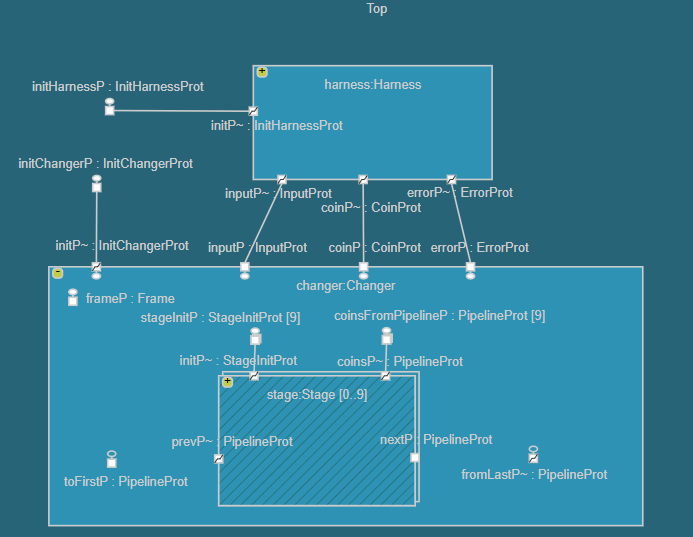
The last design (GiveChangeV5) implements this using the following UML-RT features:- optional capsule instances (which can be created and destroyed at runtime), and
- unwired ports that are wired at runtime by the application using service access (SAPs) and provision points (SPPs).
incarnatefunction. Note how the capsule diagram of theChangercapsule does not show the pipeline (because its shape (length) is unknown prior to runtime), but does show that the stage instances are optional and that their pipeline portsprevPandnextPare unwired at the start (and, thus, wired dynamically).
- Task description:
Import and build the model realizing this fully general process of giving change (GiveChangeV5_forA3.zip). Consider the system execution caused by the following invocation:$ ./executable.exe -URTS_DEBUG=quit -UARGS 1575 2000 200 100 10 5Execute and inspect the model to understand the resulting execution. Draw a sequence diagram (using a tool of your choice, i.e., you don't have to use Model RealTime) showing all the messages exchanged between all capsule instances (i.e.,Top,harness,changer, and all pipeline stages) as a result of this invocation. Your diagram should also include calls to theincarnatefunction, if any. If messages or calls toincarnatecarry data, please include them as well.Put your sequence diagram into your Space Invader project folder from Part I and give it the name
Part2.*where '*' is some extension for image files.
Part III (3 points total)
Complete the OnQ survey 'A3 questionnaire: comparing representations' (you should have received an invitation email from OnQ). Your answers are anonymous and will not be graded. However, participation is mandatory: Once 13 (class size) survey responses have been received, the full 3 points will be awarded to every student in class.What to hand in:
- Zip up the contents of your modified Space Invaders folder into a single archive (.zip file).
Use
[firstName]_[lastName]_A3_CISC844_W26.zipas name where[firstName]and[lastName]are replaced by your first and last names, respectively. Upload this archive to OnQ.
Marking:
For Tasks 1 to 3 of Part I, your changes to the model will be marked based on their correctness and completeness (with respect to the assignment instructions and the system description), but also using the design guidelines discussed in class. Your answer to Subtask 2.d will be marked on clarity and correctness.
Last modified: Sun Feb 22 14:46:24 EST 2026